

RainViewer can now refresh the radar map every 2 minutes instead of every 5. It is a premium setting you switch on yourself, and it works on the radar layer. The result is concrete: the newest precipitation reaches your screen up to 3 minutes sooner. If you track fast-moving storms, those minutes decide whether you are looking at where a cell is now or where it was a scan ago. Open the update-interval control under the timeline and switch from 5 min to 2 min.
What changes when you switch to 2 minutes
By default, RainViewer pulls a fresh radar composite every 5 minutes. With 2-minute updates on, it pulls one every 2 minutes. RainViewer stitches that composite from hundreds of separate radars, so a shorter refresh means whatever new scan has arrived reaches your screen up to 3 minutes sooner.
This does not make any single radar scan faster. A weather radar still completes its scan on its own schedule, usually every few minutes. What changes is the wait between a scan reaching RainViewer and your map showing it. At 5-minute updates you can sit on an older frame for most of the cycle. At 2 minutes that gap shrinks. Radar already shows rain as it happens, which is why radar beats a forecast for the next hour ; faster updates close the last delay between the scan and you.
The control sits next to the timeline at the bottom of the map. It shows the interval you are on, and reads 2 min when the faster setting is active.
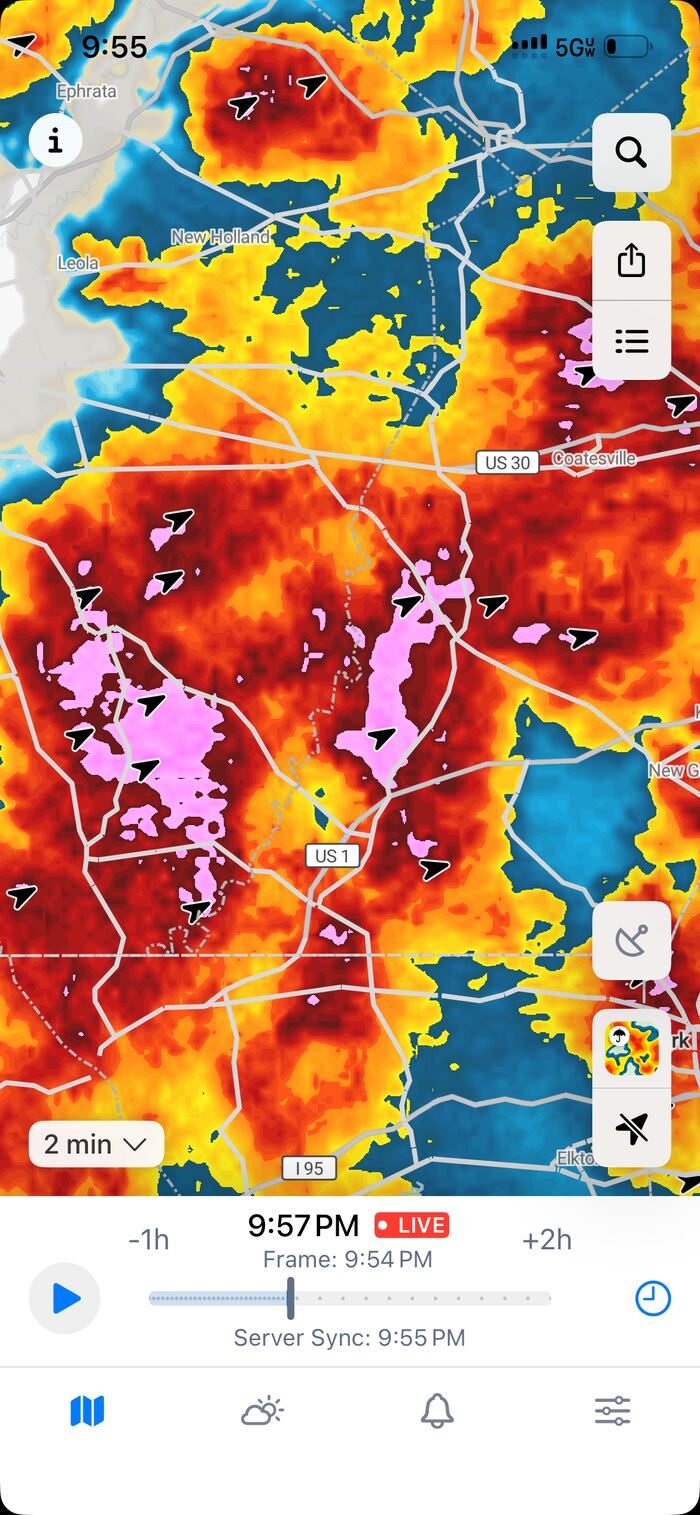
Where you will notice it most
You will see the biggest difference where the local radar network already produces new scans quickly. RainViewer pulls from some of the fastest networks in the world, and where a radar refreshes every few minutes, most 2-minute updates bring something new to the map.
Those fast networks include the United States (NEXRAD), Germany (DWD), the Czech Republic, the Netherlands, Slovakia, Romania, and much of Canada. In these places, 2-minute updates pay off the most.
Some networks scan less often, every 10 to 15 minutes in parts of the world. There, a 2-minute refresh still gets you each new scan sooner, but new scans arrive less often, so the gain is smaller. Outside radar coverage, where the map has no live radar to show, the setting changes nothing.
How to turn it on
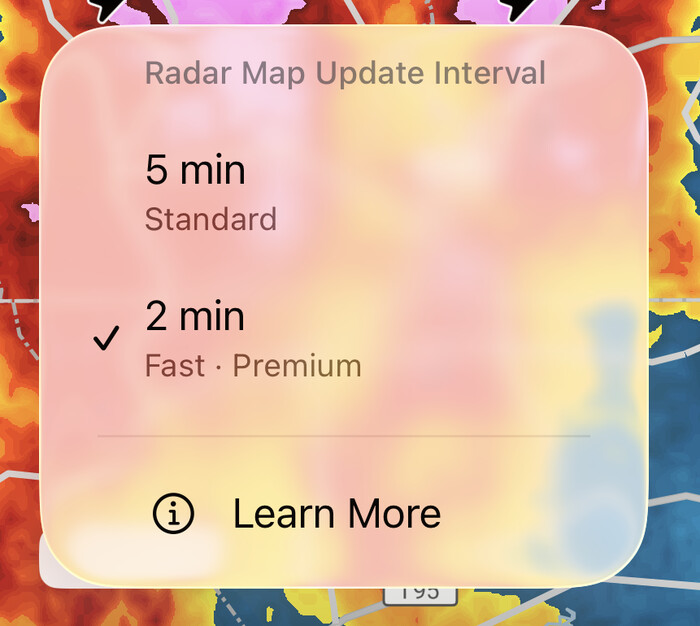
2-minute updates live in the same place you change the radar map’s update interval. Tap the interval control under the timeline, pick the faster option, and the map starts refreshing on the new cycle right away. It takes one tap, and you can switch back just as easily.
You will see two options: 5 min (Standard) and 2 min (Fast). The 2 min option is the premium one. Tap it, and you are done.
The honest trade-offs
Faster updates are not free for your device. Pulling the map more often uses more data, and on a slow or busy connection it can make the app feel heavier. That is exactly why 2-minute updates are off by default, and why the choice is yours.
If you are on a tight data plan or roaming, leave it on 5 minutes for everyday use and switch to 2 minutes when a storm is actually close. The setting is made to be turned on and off, not set once and forgotten. Five minutes stays the default for a reason: for most people, most of the time, it is enough.
Who should use it
2-minute updates are for people who act on what the radar shows in the next few minutes, not the next few hours. A few common cases:
- Storm chasers and spotters tracking a cell that is moving and changing fast.
- Commuters timing a dry window for a ride, a walk, or a school run around a passing shower.
- Severe-weather watchers who want the freshest picture of a line of storms as it builds.
- Pilots, sailors, and event organisers making go or no-go calls on short notice.
If you plan further ahead than the next few minutes, our guide to planning your day with weather radar covers the longer view.
Frequently asked questions
Do 2-minute updates cost extra? No. They are included with any RainViewer subscription, both Essential and PRO. There is no add-on or separate purchase. You can see what each plan includes on the premium features page .
Do they work everywhere? They work wherever the live radar layer has coverage. How much you gain depends on how often your local radar scans; fast networks like the United States and Germany benefit the most.
Do they change the forecast? No. 2-minute updates only affect how often the radar layer refreshes. Forecasts, satellite, and other layers are unchanged.
Why didn’t my area get faster? Most likely the local radar there scans every 10 to 15 minutes. RainViewer can deliver each new scan sooner, but it cannot make a radar scan more often than it does.
Can I switch back to 5 minutes? Yes, anytime, in the same control. Many people leave it on 5 minutes day to day and switch to 2 minutes only when the weather is moving fast.
Already on Essential or PRO? Open RainViewer and switch the update interval under the timeline to 2 min.

 RainViewer
