

Two days can both show an 80% chance of rain. One brings 2 millimetres (0.08 in). The other brings 30 (1.2 in). A percentage cannot tell them apart.
RainViewer 8.4 for iPhone and iPad can. The hourly and daily forecast charts now show rainfall totals in millimetres or inches, and the forecast tab opens with nowcast and radar. On iPhone Duo, Apple’s first foldable iPhone, the layout follows the way the phone folds.
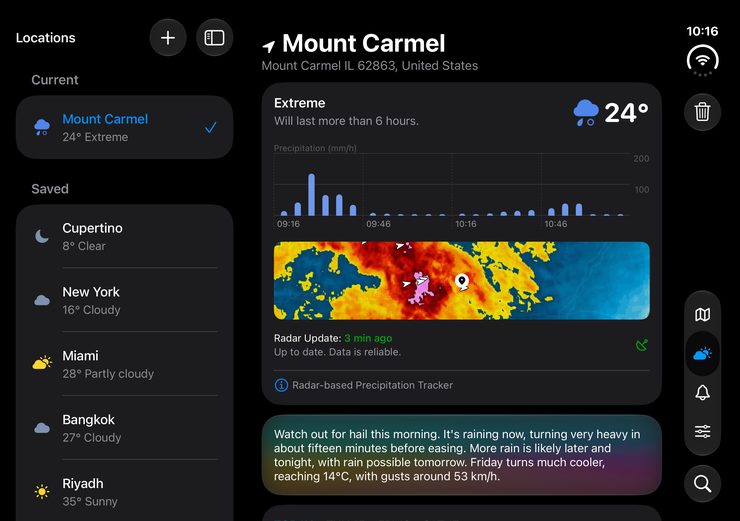
The redesigned forecast tab
The forecast tab now answers three questions: when rain starts, how much is coming, and how much already fell.
When does rain start and stop?
The top of the tab holds the nowcast, the rain intensity chart, a radar map preview, and the temperature. The nowcast looks up to 2 hours ahead with Essential or Pro. The chart marks when rain starts, when it peaks, and when it stops. The radar preview sits beside it, so the timing and the map are in one view. Tap the preview and the full map opens on your location at the same zoom.
The AI weather summary follows right below. Cards for sunrise and sunset and air quality come after the charts.
How much rain is coming?
Under each hour and each day with rain, the forecast shows the rainfall total next to the chance of rain. Amounts use millimetres or inches, whichever you set. Hours and days without rain show nothing. Any amount above zero appears, even a very small one.
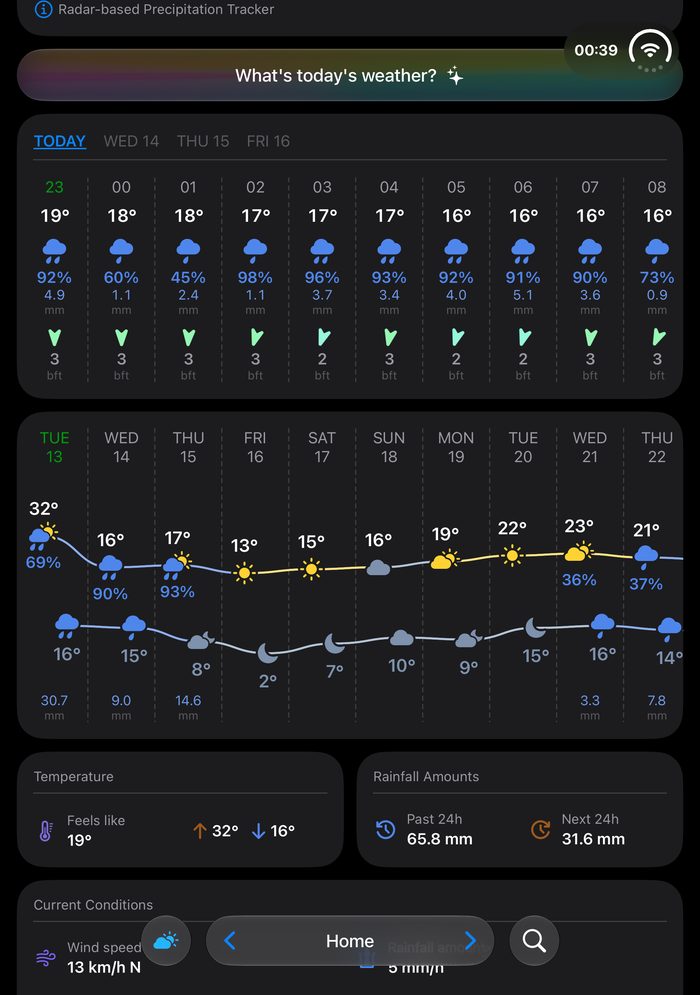
A day with 5 millimetres (0.2 in) and a day with 40 millimetres (1.6 in) can carry the same percentage, and in the chart they look nothing alike. The hourly totals also show how fast rain falls. 15 millimetres (0.6 in) over 6 hours is steady rain. 15 millimetres in one hour is a downpour. Same total, very different afternoon.
RainViewer 8.4 shows the rainfall total for every hour and every day with rain in its forecast charts, in millimetres or inches.
How much rain already fell?
Next to the temperature card with the high and low of the day, the Rainfall Amounts card shows how much rain fell in the last 24 hours and how much is expected in the next 24. The past amounts come from RainViewer’s own radar accumulation data, the same source as Rainfall Totals on the map.
For a single spot, open Rainfall Totals on the map. Pick a window of 1, 3, 12, 24, or 48 hours and tap any point. RainViewer shows the exact amount with a rating from Trace to Extreme. 1 millimetre of rain is 1 litre of water on each square metre, so 20 millimetres (0.8 in) is 20 litres per square metre.
The amounts are quantitative precipitation estimates (QPE) built from radar data. The Rainfall Totals (QPE) guide explains each window and the colour scale.
Foldable iPhone Duo: radar on a bigger canvas
iPhone Duo goes on sale on 23 October in more than 70 countries and regions. It is Apple’s first foldable iPhone, and its inner display is the largest Apple has ever put on an iPhone. Closed, it still fits in a pocket. RainViewer is ready for it.
The two sizes suit two ways of checking the weather. On the smaller screen you check the rain in two seconds: is it coming, when, and how much. The inner display is for when you want to stay with it. A storm is wide, and on a phone you see a slice of it. On Duo you see the whole system: the front, the gaps, the tiny cells building behind it. There is room to watch how they move and to understand the pattern behind where the rain is heading.
RainViewer is built for that view. In fullscreen mode the interface steps aside and the storm fills the display.
This is where Pro fits best. PRO Radar opens individual radar stations and their products: horizontal and vertical reflectivity, radial velocity, differential reflectivity, spectrum width, correlation coefficient and specific differential phase. Tilt control slices the storm by height, from rain at ground level to the top of the cloud. Each product is its own view of the same storm, and the bigger screen gives you room to read them one by one.
Until Duo goes on sale, the same layout is already on iPad.
Plans and trial
What do Essential and Pro include?
Rainfall totals in the forecast charts and Rainfall Totals on the map come with both Essential and Pro.
Pro goes further into the storm itself. It adds PRO Radar : individual radar stations, products such as radial velocity, differential reflectivity and spectrum width, and tilt control. PRO Radar depends on local radar station coverage, so availability varies by region.
RainViewer Essential and Pro both include rainfall totals. Pro adds PRO Radar with station-level products and tilt control.
Which plan fits you?
Essential is for the two-second check: will it rain, when, and how much. Pro is for the deep dive: the structure of a storm, the small cells inside it, the pattern behind where the rain is heading. That is the kind of reading a big screen like iPhone Duo is made for.
How does the trial work?
Both Essential and Pro start with a 14-day free trial.
Update RainViewer to 8.4 and open the forecast tab.

 RainViewer
